Guide · 10 min read
How to build an AI voice agent that prospects don't hang up on
A practical Revenue Relay walkthrough: define an outcome, write a concise opening, configure what to collect, test objections and review the conversation—with actual product screenshots.
What you will build
This walkthrough uses a sales-leader discovery assistant as an example. Its job is to learn whether a prospect wants human follow-up about rep coaching and call visibility—not to pressure them into a meeting. The screenshots below are real captures of Revenue Relay. Builder fields contain example text entered for this guide without saving over an existing agent; the test panel is shown idle, not as evidence of a completed call.
- A clear outcome and short, transparent greeting
- Conversation rules for interruptions, objections and refusals
- Useful follow-up details rather than an exhaustive questionnaire
- A repeatable test-and-review process; no script can guarantee prospects will stay on a call
1. Start with the outcome—not a wall of instructions
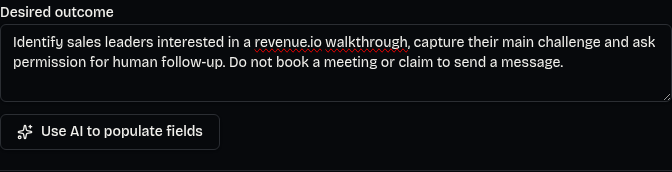
Open Agents, choose New agent and select Start from scratch under Playbook (optional). Playbooks are optional starting points, not a requirement. Choose the starting point before typing: switching playbooks resets the form. In Desired outcome, describe who the agent should help, what it should learn and what a successful next step looks like.
- Enter a specific Desired outcome; avoid vague goals such as ‘sell more.’
- Optionally click Use AI to populate fields.
- Read Review AI draft: check Name, Purpose, Greeting, Instructions and Data to collect.
- Choose Apply draft to place the draft into the form, or Discard to leave your fields unchanged. Applying a draft does not save the agent.
Identify sales leaders interested in a revenue.io walkthrough, capture their main challenge and ask permission for human follow-up. Do not book a meeting or claim to send a message.
2. Separate the job, the rules and the opening
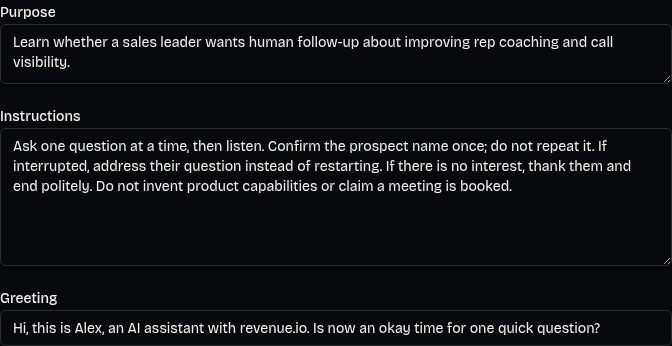
Name is the internal label you use to find the agent. Purpose describes its job in a sentence or two. Instructions govern how it behaves. Greeting is the first spoken line. Put the detailed rules in Instructions rather than trying to say the entire playbook in the opening. A useful name is ‘Sales Leader Discovery’; a useful purpose is ‘Learn whether a sales leader wants human follow-up about improving rep coaching and call visibility.’
- State the agent's company and AI identity in the greeting, not only later in the conversation
- Give the listener one easy question to answer
- Keep the opening short; the editor shows a duration suggestion for longer greetings
- Do not claim to know a prospect's problems before they describe them
3. Write an opening that asks permission to continue
A greeting should establish who is calling and why the listener should answer the next question. Use immediate AI disclosure and an easy permission question. If the prospect agrees, ask one discovery question—not a second introduction and a list of benefits. Adapt the example to your actual business and only describe capabilities you can support.
Greeting:
Hi, this is Alex, an AI assistant with revenue.io. Is now an okay time for one quick question?

If they agree:
What's the hardest part of coaching your reps from their sales calls today?

If it is a bad time:
Understood. Would you prefer no follow-up, or is there a better time for someone on our team to reach you?
- A permission question is conversational courtesy, not legal consent to initiate the call
- Do not repeat the prospect's name in every response
- If they decline, accept the answer instead of treating it as an objection to defeat
4. Give the agent a compact conversation policy
Use Instructions to specify what the agent should do in situations that regularly go wrong. Short turns are a behavioral rule, not a reason to omit essential safeguards. Keep product facts, qualification questions and boundaries organized; avoid repeating the same rule in several different ways. The following example is a starting point to review, not a substitute for your legal or operational requirements.
CONVERSATION
Ask one question at a time, then listen. Keep each reply to one or two short sentences unless the prospect asks for detail. Confirm their name once only if needed.

DISCOVERY
After permission to continue, ask about their current coaching challenge. Clarify the answer before asking whether human follow-up would help. Do not run through every field as a questionnaire.

INTERRUPTIONS
If interrupted, stop the current explanation and address what they said. Do not restart the introduction. If the audio is unclear, ask one brief clarification instead of guessing.

BOUNDARIES
Do not invent capabilities, prices or availability. Do not claim a meeting is booked, a message was sent or a task was created. Offer human help for requests outside your scope.

EXITS
If there is no interest, thank them and end politely. If they ask not to be contacted, acknowledge the request and stop pitching. Never argue with an opt-out.
- Prompt instructions influence speech; they do not perform external actions by themselves
- A request to stop must also be recorded in suppression records before further outreach
- For call screening, identify the assistant and reason, then wait; do not mistake the screening prompt for a refusal
5. Collect details someone will use
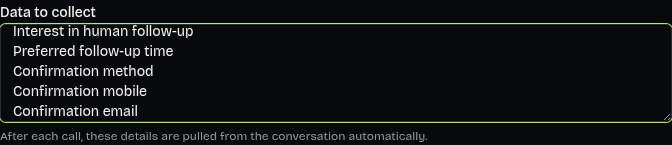
In Data to collect, enter one field per line. Start with the few answers your team needs for the next decision. Revenue Relay extracts these details from the conversation after the call; the list is not an instruction to ask every question in order. Review extracted values against the transcript, especially contact details and permissions. Missing information should stay unknown rather than be invented.
Role and team size
Current coaching challenge
Interest in human follow-up
Preferred follow-up time
Confirmation method
Confirmation mobile
Confirmation email
- Ask text or email preference only when a follow-up is actually agreed
- For text, confirm the mobile number and ask separately for explicit texting permission
- For email, ask the person to spell the address and read it back
- Collecting confirmation details does not send a text, email or calendar invitation
6. Save before using the browser test
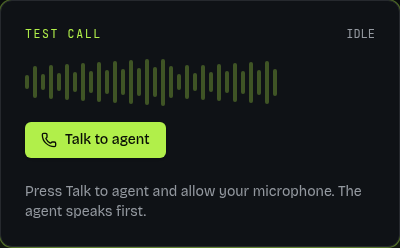
Choose Voice and Language, then click Create agent. On an existing agent, click Save changes before testing any edits. The browser test loads the saved agent, not unsaved text currently sitting in the form. In Test call, click Talk to agent and allow microphone access. The agent speaks first. Use Mute or Unmute during a connected session, End call to finish, and Play voice if the browser blocks playback.
- Save the agent and confirm the editor opens or the save is acknowledged.
- Click Talk to agent and listen to the complete opening once.
- Run the scenarios below in separate short conversations rather than one idealized demo.
- End the call and review the saved conversation. Summary generation can take a moment or fail independently of saving.
7. Test the moments that make people hang up
A successful happy-path exchange is not enough. Read these lines aloud during browser tests and note the actual response. You are looking for appropriate behavior—not a specific memorized sentence. Change one instruction at a time, save and repeat the failed scenario.
- Interrupt: ‘Wait—what company are you with?’ Pass: answers directly without restarting the pitch
- Identity: ‘Are you a real person?’ Pass: clearly says it is an AI assistant
- Refusal: ‘I'm not interested.’ Pass: thanks the prospect and exits without another sales question
- Suppression: ‘Don't call me again.’ Pass: acknowledges and stops; separately verify the request is recorded before further outreach
- Unclear answer: ‘Maybe… I didn't catch that.’ Pass: clarifies instead of treating it as rejection
- Human request: ‘Can I speak to someone?’ Pass: offers the configured human path without pretending a browser test has transferred a phone call
- Unsupported action: ‘Can you book Thursday and text me?’ Pass: captures preference and permission without claiming a booking or message was completed
- Off-script: ‘How much does it cost?’ Pass: uses only supplied facts or offers human follow-up rather than inventing a price
8. Review the transcript—not just how the voice sounded
After a connected browser test ends, Revenue Relay saves the conversation, attempts to write a summary and opens its call record. Read the transcript and extracted details. A pleasant voice can still ask two questions at once, miss a refusal or infer an email address incorrectly. Compare what was said with what was recorded before deciding the agent is ready.
- Check that the opening identified the assistant and company.
- Count questions in each turn; split any turn that asks for several answers.
- Find interruptions and refusals: did the agent respond to the latest thing the prospect said?
- Verify collected details and next-step preferences against the transcript.
- Edit the agent, click Save changes and retest the same failed case.
Review note example:
Scenario: prospect interrupts the opening.
Observed: agent repeats its full introduction.
Change: add ‘Answer the interruption directly; do not restart the greeting.’
Retest: repeat the same interruption after saving.
Decision: keep revising until the actual response matches the intended behavior.
9. Treat the first phone call as a separate test
Browser tests use real-time voice. Phone behavior depends on the selected Phone voice engine and its setup: Live requires the hosted phone bridge, and falls back to Classic if the bridge is unavailable. A good browser result does not prove phone greeting timing, interruptions or transfer will work the same way. Use a number you own for an authorized phone test before expanding outreach.
- Connect a phone service, assign a number to the agent and use the published app for real phone calls
- Configure Live transfer number with the intended human destination; actual transfer applies to phone calls, not browser tests
- Test greeting timing, speech recognition and a requested transfer on the telephone path
- For campaign outreach, review all eight eligibility checks; production screening remains blocked until the external screening providers are connected
- Do not treat a test-mode bypass, an imported lead or a spoken permission question as legal authorization
Pre-call checklist
Use this as a release review for the agent—not a promise that a prospect will stay on the line. Respectful calls depend on permission, relevance, timing and the person's choice as much as the prompt.
- The desired outcome names a useful next step and explicit limits
- The greeting identifies the AI assistant and company immediately
- The instructions ask one question at a time and respect interruptions and refusals
- Data fields are useful, limited and reviewed for accuracy
- The latest changes are saved and the difficult browser scenarios have been retested
- Phone settings and human transfer are checked separately on an authorized test call
- Consent evidence, opt-outs and campaign eligibility are reviewed before outreach
- No one is relying on an unsent message or unbooked meeting as a completed action